WhatsApp Shared Inbox: One Number, Your Whole Team (2026)
A WhatsApp shared inbox puts every number and every teammate in one place. See how it works, how to assign chats, and how AI handles the routine.
On this page
When your whole team shares one WhatsApp phone, things go wrong. Messages get missed. Two people answer the same customer. Nobody knows who’s handling what. A WhatsApp shared inbox fixes that. Every number and every conversation lives in one place, and each teammate works from their own login.
This guide explains what a WhatsApp shared inbox is, how it works for teams, how to set one up, and how AI can answer the routine questions before your team even sees them.
What Is a WhatsApp Shared Inbox?
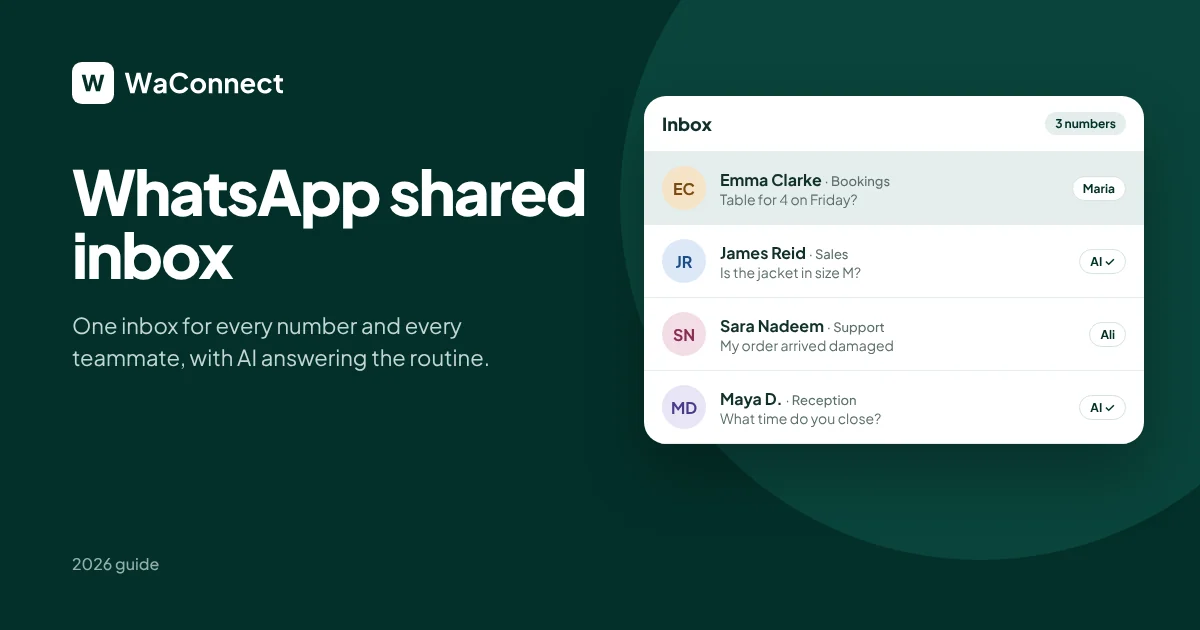
A WhatsApp shared inbox is one dashboard where your whole team reads and replies to WhatsApp messages from the same business number, or from several numbers at once. Instead of passing a phone around, everyone works from their own screen.
With waconnect.ai, a WhatsApp shared inbox gives your team:
Every number in one place: reception, bookings, sales and support, all in a single inbox
Every chat shared: your team sees every conversation, with full history
Chat assignment: each conversation is assigned to the right person, like “Assigned to Maria, Reception”
AI replies: routine questions get answered instantly, from your own business information
Smart handover: complaints and unusual requests go straight to a teammate
Why Teams Need a WhatsApp Team Inbox
A single phone works for one person. But WhatsApp for teams needs more than one phone. As soon as a second person replies, it gets messy. A WhatsApp team inbox gives every teammate their own view of the same conversations:
No more missed messages: every chat is visible to the whole team
No double replies: each chat has an owner, so customers hear from one person
Faster replies: whoever is free picks up the next chat
Clear ownership: you can see who is handling which customer
Works from any computer: your team isn’t tied to one phone
Manage Multiple WhatsApp Numbers in One Place
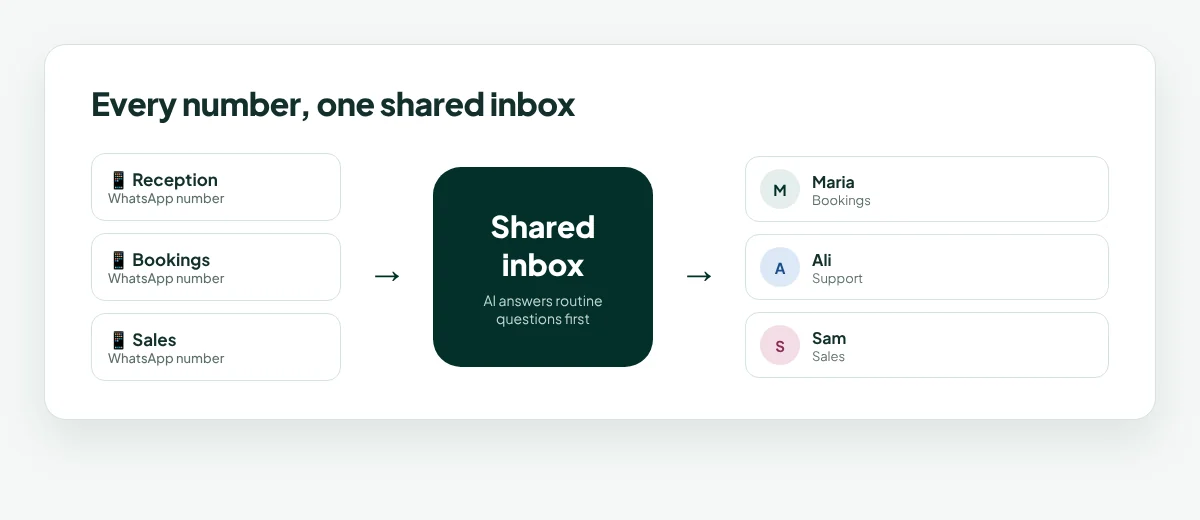
Many businesses run more than one WhatsApp number: one for reception, one for bookings, one for sales. With waconnect.ai, you can manage multiple WhatsApp numbers from one WhatsApp shared inbox.
You connect each number by scanning a QR code from WhatsApp’s Linked devices screen. It takes about 30 seconds per number. Every chat shows which number it came in on, so your team always knows the context.
How a WhatsApp Shared Inbox Works With AI
A WhatsApp shared inbox gets even more useful with AI replies. The AI can answer a message before it reaches your team. It uses your website, your documents and your Shopify store.
Here’s how it works in waconnect.ai:
A customer sends a message to any of your connected numbers.
The AI answers routine questions instantly: opening hours, prices, availability, product stock.
Your team can edit AI drafts before they’re sent, or let the AI reply on its own.
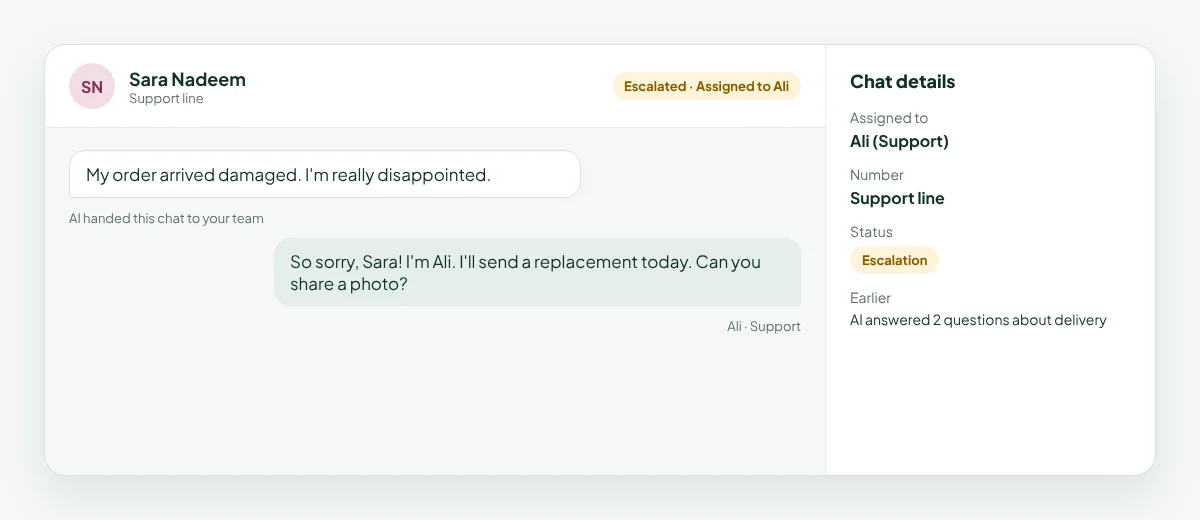
The AI hands complaints and unusual requests to a teammate and records them as escalations.
The AI records interested customers as leads for your team to follow up.
You choose whether the AI replies 24/7, or only during your business hours.
WhatsApp Business Multiple Users: How It Works
The WhatsApp Business app is built for one person on one phone. A WhatsApp shared inbox gives you WhatsApp Business multiple users on the same number:
Each teammate gets their own login to the waconnect.ai dashboard
Everyone sees the same conversations in real time
Chats are assigned so each customer has one owner
Your phone stays connected as the linked device, and you keep your existing number
How to Set Up a WhatsApp Shared Inbox in 5 Steps
Sign up at waconnect.ai. New businesses start with 500 free credits.
Connect your numbers. On each phone, open WhatsApp, go to Settings → Linked devices → Link a device, and scan the QR code.
Invite your team. Add your teammates so each person has their own login.
Train the AI. Add your website, upload your documents, and connect Shopify if you sell online.
Start assigning chats. Route conversations to the right person, and let the AI handle the routine.
WhatsApp Shared Inbox Best Practices
Give every chat an owner. Assign conversations so customers always hear from one person.
Split numbers by purpose. Reception, bookings and sales work best as separate numbers in one inbox.
Let AI take the repeat questions. Train it on your hours, prices and policies so your team focuses on real conversations.
Use handover for anything sensitive. Complaints, refunds and big orders should reach a teammate quickly.
Review your inbox weekly. Look at what customers ask most, and add missing answers to your AI’s sources.
WhatsApp Shared Inbox Examples by Business
Restaurants: reception answers walk-in questions, the bookings line handles reservations, and the AI confirms opening hours and menu questions.
Clinics: the front desk manages appointments, and the AI answers routine questions about hours and prices.
Online stores: the sales team handles big orders, support handles returns, and the AI answers stock and delivery questions from Shopify.
Hotels: guest services and reception share one inbox, and the AI answers check-in times and breakfast questions.
How waconnect.ai Works as Your WhatsApp Shared Inbox
One shared inbox for every number and every teammate
Chat assignment so each customer has one owner
AI replies trained on your business: website, documents and Shopify
Editable AI drafts your team can review before sending
Smart handover, with escalations and leads recorded
24/7 or business hours, your choice
Your existing numbers, connected by QR code in about 30 seconds each
To learn how the AI part works, read our guide to the WhatsApp AI chatbot for business.
WhatsApp Shared Inbox FAQ
What is a WhatsApp shared inbox?
It’s one dashboard for your whole team. Everyone reads and replies to WhatsApp messages from one or more business numbers, each with their own login.
Can multiple people use one WhatsApp Business number?
Yes. With a WhatsApp shared inbox like waconnect.ai, your whole team works from the same number, each with their own login.
Can I manage multiple WhatsApp numbers in one inbox?
Yes. Connect each number by QR code, and all their chats appear in one waconnect.ai inbox, labeled by number.
How do I assign WhatsApp chats to teammates?
In the waconnect.ai inbox, assign each conversation to the right person, so every customer has one owner.
Does the AI work inside the shared inbox?
Yes. The AI answers routine questions from your website, documents and Shopify store, and hands complaints and unusual requests to your team.
How much does a WhatsApp shared inbox cost?
waconnect.ai works on prepaid credits. New businesses start with 500 free credits.
Bring your whole team into one WhatsApp inbox
Connect your numbers in minutes and start free with 500 credits.
Start free with 500 credits at waconnect.ai