WhatsApp Business Auto Reply: 30 Message Samples (2026)
Copy 30 WhatsApp Business auto reply message samples for greetings, away messages, bookings and FAQs, plus how to set them up in 5 minutes.
On this page
A customer messages you at 9 PM asking if you’re open tomorrow. Another asks for your prices while you’re with a client. If nobody answers, many of them simply move on. A WhatsApp Business auto reply makes sure every message gets an instant response, even when you can’t type one.
Looking for an auto reply message sample for business WhatsApp? Below are 30 ready-to-copy samples for greetings, away messages, holidays, bookings and common questions, plus how to set up a WhatsApp Business auto reply in about 5 minutes, and when a simple auto reply isn’t enough.
What Is a WhatsApp Business Auto Reply?
A WhatsApp Business auto reply is a message that sends automatically when a customer contacts you. The free WhatsApp Business app has three tools for this:
Greeting message: sends automatically when a customer messages you for the first time, or after 14 days without a chat.
Away message: sends when you’re unavailable: always, on a custom schedule, or outside your business hours.
Quick replies: saved answers you send yourself by typing “/” in a chat. You can store up to 50.
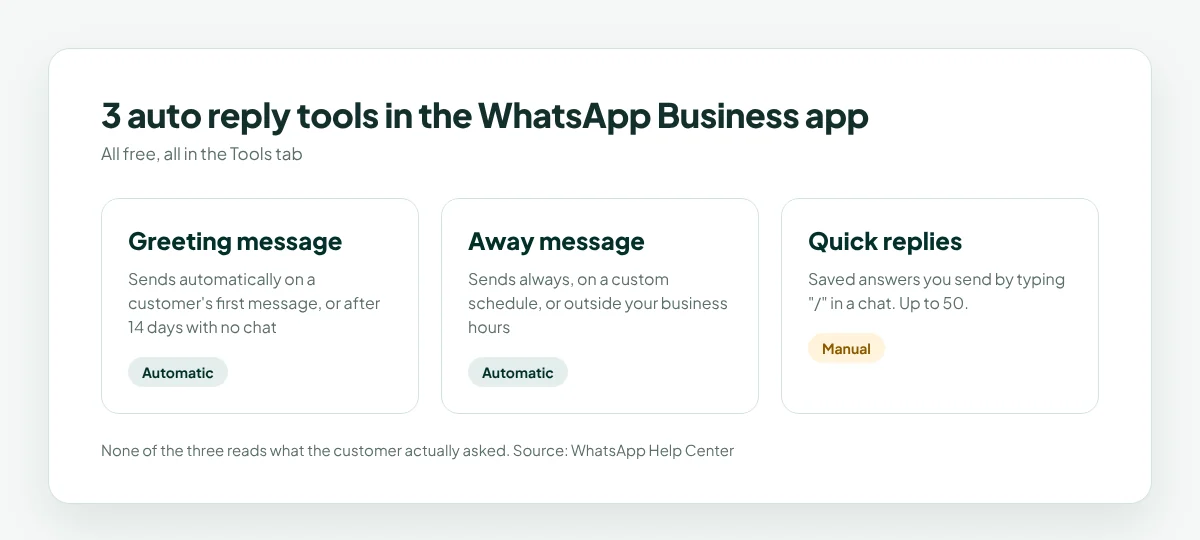
The greeting and away messages are truly automatic. Quick replies still need a person to choose and send them.
How to Set Up a WhatsApp Business Auto Reply
Set up a WhatsApp away message
Open the WhatsApp Business app and go to the Tools tab (on some versions: Settings → Business tools).
Tap Away message and turn on Send away message.
Edit the message text.
Tap Schedule and choose Always send, Custom schedule or Outside of business hours.
Choose Recipients (everyone, or specific groups) and tap Save.
Set up a WhatsApp greeting message
In the Tools tab, tap Greeting message.
Turn on Send greeting message.
Edit the message and choose recipients.
Tap Save.
Set up quick replies
In the Tools tab, tap Quick replies.
Tap +, write the message and give it a shortcut, like /hours or /price.
Tap Save. In any chat, type “/” to pick one.
Tip: your phone needs an internet connection for the greeting message to send.
30 WhatsApp Business Auto Reply Message Samples
Copy these and replace the parts in {curly brackets}. Keep every WhatsApp Business auto reply short, friendly and clear about what happens next.
Greeting messages
Hi {name}, thanks for messaging {business}! How can we help today? You can ask about prices, bookings or opening hours.
Welcome to {business} 👋 We usually reply within {time}. Tell us what you need and we’ll take it from here.
Hi! Thanks for reaching out. To help you faster, tell us: are you asking about a booking, an order or something else?
Hello and welcome! Our menu is here: {link}. Want to book a table? Reply with your date, time and number of guests.
Hi {name}! Thanks for contacting {business}. You can also book online anytime: {link}.
Welcome back, {name}! Great to hear from you again. How can we help this time?
WhatsApp away messages
Thanks for your message! We’re closed right now and open again at {time}. We’ll reply first thing.
Hi! Our team is offline until {time}. Leave your question here and we’ll get back to you as soon as we’re back.
Thanks for reaching out! We’re with other customers right now and will reply within {time}.
We’re closed for the night 🌙 For bookings, you can use {link}. We’ll answer everything else in the morning.
Thanks for your message! Our hours are {hours}. We’ll reply as soon as we open.
Hi! We’ve received your message. Replies may take a little longer today, but we’ll get back to you before {time}.
Holiday and closed-day messages
Happy holidays! We’re closed from {date} to {date} and back on {date}. We’ll reply as soon as we return.
We’re closed today for {reason}. We’ll be back tomorrow at {time}. Thanks for your patience!
Thanks for your message! Our team is away for the long weekend. We’ll reply on {day}.
Booking and appointment messages
Hi {name}, your booking for {service} on {date} at {time} is confirmed. Reply 2 if you need to change it.
Reminder: your appointment is tomorrow at {time}. Reply 1 to confirm or 2 to reschedule.
Thanks for booking with {business}! We’ll see you on {date}. Need directions? {link}
We’d love to fit you in! Our next free slots are {slots}. Which one works for you?
Hi {name}, we missed you today. Would you like to book another time this week?
FAQ replies (great as quick replies)
/hours: We’re open {days} from {time} to {time}.
/price: Our prices start at {price}. Here’s the full list: {link}.
/location: We’re at {address}. Here’s the map: {link}. Parking is {parking info}.
/delivery: We deliver within {area}. Orders arrive in {time}, and delivery is {fee}.
/payment: We accept {methods}. You can also pay online here: {link}.
/stock: Let me check that for you! Which size or color are you looking for?
Follow-up and thank-you messages
Thanks for visiting {business}, {name}! How was everything? Reply with a number from 1 to 5.
Thanks for your order! It’s on its way and should arrive by {date}. Track it here: {link}.
Thank you for your review, {name}! It means a lot to our team.
Hi {name}, just checking in: did you find what you were looking for? We’re happy to help.
WhatsApp Business Auto Reply Mistakes to Avoid
Sending a generic reply to everything. A WhatsApp Business auto reply that says “We’ll get back to you soon” doesn’t answer anything. Add the next step: a link, your hours or a question.
Leaving an old away message on. An away message that says you’re closed when you’re open loses customers. Check your schedule after holidays.
Making it too long. Customers read on their phones. Two or three short sentences is plenty.
Forgetting to follow up. An auto reply buys you time, not a free pass. Answer the real question as soon as you can.
Using two tools at once. If you connect an AI or automation tool, switch off the app’s own away and greeting messages so customers don’t get two replies. WhatsApp’s help center notes that greeting and away messages are disabled automatically once Meta’s own Business Agent is connected.
When a Standard Auto Reply Isn’t Enough
Every WhatsApp Business auto reply in the app has one big limit: none of them reads what the customer actually asked. A customer asking “Do you have the blue jacket in size M?” gets the same “Thanks for your message!” as someone asking for your address. They still have to wait for a person.
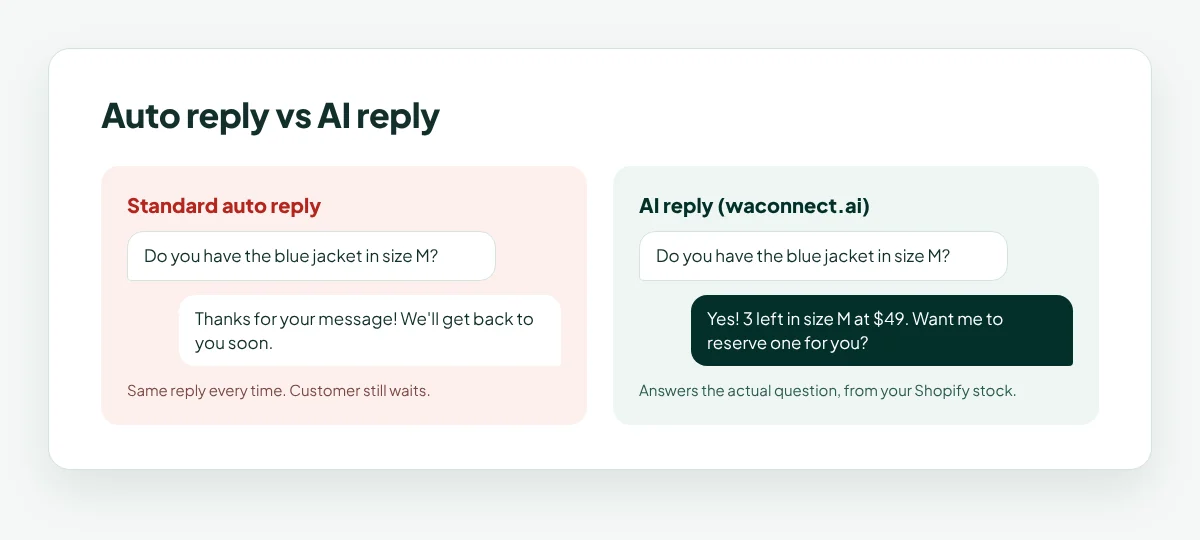
That’s where AI replies come in. Instead of a fixed message, an AI reply reads the question and answers it from your own business information: your hours, menu, price list, documents or product stock.
How waconnect.ai Turns Auto Replies Into Real Answers
waconnect.ai gives your WhatsApp Business number AI replies that answer the actual question, instantly.
Trained on your business: upload documents, add your website, or connect your Shopify store so the AI knows your products, prices and stock.
Your existing number: connect by QR code in about 2 minutes. No Business API, no Meta approval.
24/7 or your hours: the AI can answer around the clock or only during business hours, your choice.
Smart handover: complaints and unusual requests go straight to your team.
One shared inbox: every number and every teammate in one place.
For more ideas on what to automate, read our guide to WhatsApp automation for small business.
WhatsApp Business Auto Reply FAQ
How do I set up an auto reply on WhatsApp Business?
Open the WhatsApp Business app, go to the Tools tab, tap Away message or Greeting message, turn it on, write your message, set the schedule and recipients, and tap Save.
Can regular WhatsApp send auto replies?
No. A WhatsApp auto reply needs the free WhatsApp Business app or a business tool connected to WhatsApp. Regular WhatsApp has no away or greeting messages.
When does the WhatsApp greeting message send?
It sends when a customer messages you for the first time, or when they message you after 14 days with no chat.
How many quick replies can I save?
Up to 50 in the WhatsApp Business app. You send them manually by typing “/” in a chat.
What should a WhatsApp away message say?
Say that you’re away, when you’ll reply, and what the customer can do meanwhile, such as a booking link or your opening hours.
Can an auto reply answer specific customer questions?
The app’s built-in auto replies can’t; they send the same text every time. An AI reply tool like waconnect.ai reads the question and answers it from your own business information.
Turn your auto replies into real answers
Connect your WhatsApp number in 2 minutes and start free with $5 in credits.
Start free with $5 in credits at waconnect.ai